


Pillo: Pill Reminder & Alarm
4.85.99K Reviews
App Specs
- Version
- 0.6.24
- Updated On
- License
- Free
- Downloads
- 500,000+
- Developer
- Pillo Health Inc.
- Categories
- Medical
- Platform
- Android
Screenshots

 Analysis by AppCompare
Ever find yourself second-guessing whether you took your meds today? Enter the Pill Reminder & Health Tracker, a nifty app that’s here to save the day and your health routine. Let me walk you through my experience with this digital health assistant that promises to simplify your life by ensuring you never miss a dose again.
Readability and navigation in a medication routine
For someone whose main concern is remembering a daily dose, a medication tracker works best when it makes the next action obvious. The appeal here is its focused dashboard: rather than making me hunt through a maze of menus, it puts the routine in view. I would still take a little time during setup to check each entry carefully. A reminder is only useful when the medicine, timing, and schedule attached to it are correct.
The app is a medical tool from Pillo Health Inc., and its name can make it sound broader than a simple alarm. It is free to download, though optional in-app purchases range from $2.00 to $47.99 per item. Its average rating is 4.7 from around 14,000 ratings, with more than 100,000 installs. Those figures suggest that many people have tried it, but they cannot tell you whether its layout suits your eyesight, routine, or phone settings. I would judge that by setting up one medication first and checking how clearly its reminder appears in your normal day.
It is also worth separating a useful prompt from medical advice. A tracker can help you follow a schedule you already have, but it should not decide whether you should change a dose, take a missed one, or combine medicines. If you are unsure what to do after a missed reminder, follow the instructions from your clinician or pharmacist rather than guessing from an app entry.
Motor and sensory considerations
A reminder app can reduce the number of steps involved in keeping a routine, especially for someone who finds it difficult to remember several dose times. But the task does not end with receiving an alert: you still need to read it, open the app if needed, and record what happened. For users with limited dexterity, tremors, or discomfort with small touch targets, that interaction may be more demanding than the alert itself. I would test the whole sequence, not just whether a notification arrives.
Sound is another personal consideration. A tone that stands out in a quiet room may be unwelcome in a shared office, while a phone kept on silent may make an audible alert irrelevant. A practical approach is to choose a reminder style that fits the places you spend time and use the phone’s own notification settings to make it noticeable without being disruptive. Anyone who relies on visual cues should check that they can spot the notification promptly; anyone who relies on sound should check that the phone is not routinely muted.
The app is rated for Everyone, and the current version is 0.5.55, with Android 6.0 as its minimum operating system requirement. Those details help establish basic compatibility, but they do not guarantee an equally comfortable experience for every user. If a family member has difficulty navigating a phone, I would sit with them during setup and let them try responding to a test reminder in the places where they normally keep the device.
Worth Reading Before You Choose

Flipboard Shows What News Apps Must Do Beyond the Feed

Switching to Android Auto Means Rethinking Your Driving Routine

Google Calendar Makes a Crowded Week Easier to Manage

Ludo King Makes the Most of the Minutes Between Plans

Baby Panda World Brings Quick Play to Modern Phones, but Its Game Library Feels Busy

ESPN’s Live Game View Makes Following Close Games Easier
Situational access: home, work, and caregiving
The most convincing use case is a routine that changes shape during the day. Picture someone who takes medicine in the morning at home and another dose later while out. A tracker can make the later dose easier to remember, but only if the phone is nearby, charged, and allowed to show the alert. Before relying on it, I would check the phone’s notification behavior and build the reminder around the real routine, not an idealized schedule.
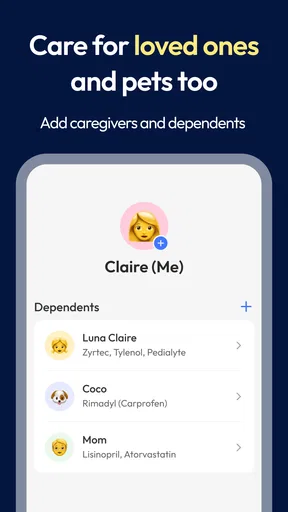
For a caregiver helping with a relative’s medication, the app’s multiple-user support can keep more than one health profile in the same account. That may be convenient when a caregiver already helps with several routines, but it also creates a responsibility to confirm whose profile is open before adding or marking anything. A simple habit—checking the person’s name and medication details before each change—can prevent an avoidable mix-up. I would not treat shared access as a substitute for clear communication among everyone involved in care.
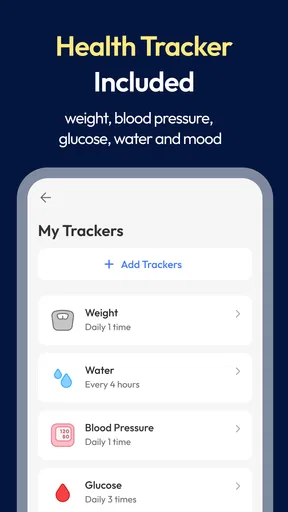
Logging health metrics can be useful when a person already records measures such as blood pressure or blood sugar and wants a consistent place to note them alongside medication. The practical value comes from recording entries in a way that makes sense later: use a steady routine and keep any relevant context in mind when discussing the records with a health professional. The app can organize personal notes, but it is not a diagnosis tool or a replacement for clinical records.
When a simpler or different option may work better
Compared with a basic alarm, a dedicated medication tracker offers a more medication-focused routine and room for health logging. A phone’s built-in calendar or reminder app may be enough for someone taking one medicine at a fixed time who simply wants a notification. The dedicated option is more appealing when several entries or health notes need to be kept together; it is less compelling if the person wants only one repeating alert and would rather avoid another app to maintain.
There is also a trade-off between detail and effort. Recording medication information and health metrics can make a routine easier to review, but every extra entry asks for attention. If someone rarely opens the app after an alert, a minimal alarm may be more dependable in practice than a fuller tracker they find burdensome. I would begin with only the information needed to support the current routine, then add other tracking only if it genuinely helps.
People who need a system that a caregiver can monitor remotely, or who want reminders on a wearable device, should check that their chosen setup actually supports those needs before depending on it. I would not assume that a phone-based reminder will reach someone when the phone is left in another room. Likewise, anyone who needs clinical decision support should look to a qualified healthcare professional, not a reminder app.
First Impressions: A Smooth Start
When I first launched the Pill Reminder & Health Tracker, I was greeted by a clean and intuitive interface. No overwhelming menus or unnecessary clutter – just a simple dashboard that lays out everything you need at a glance. I appreciated how the app focuses on user-friendliness, making it accessible for everyone, whether you’re tech-savvy or not.
The setup process was a breeze. The app guided me through entering my medication details: dosage, frequency, and even the shape and color of the pills. It’s like having a personal assistant who knows every detail about your medication schedule. And the best part? It took less than five minutes to get everything up and running.
Features That Stand Out
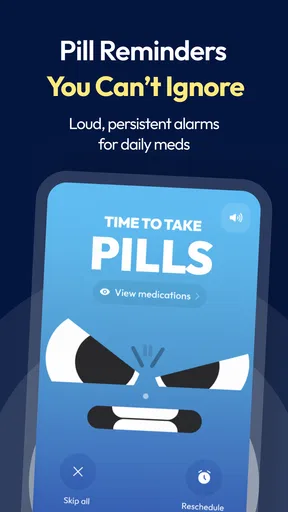
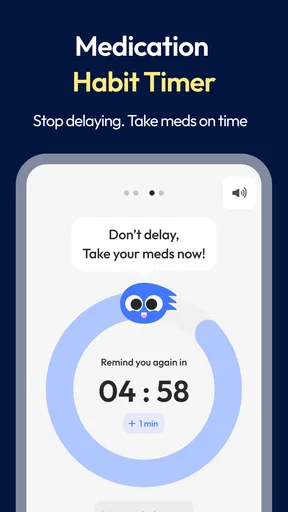
One of the standout features of this app is its reminder system. You can set up notifications for each medication, and the app will send you a gentle nudge when it’s time to take your pills. The reminders are customizable, so you can choose the alert tone and even how persistent you want them to be. Forgetting your meds is now a thing of the past.
Another feature I found incredibly helpful is the health tracking capability. Besides just reminding you about your meds, the app also allows you to log various health metrics. Whether it’s blood pressure, blood sugar, or mood tracking, you can keep all your health data in one place. This holistic approach is perfect for anyone looking to maintain a comprehensive view of their health.
Why You’ll Love It
Besides the obvious benefit of not missing a dose, the app offers a sense of reassurance. Knowing you have a reliable tool keeping track of your medication and health metrics is a comforting thought. It’s like having a digital guardian angel looking out for your well-being.
Moreover, the app supports multiple users, so if you’re managing prescriptions for family members, you can do it all from one account. This feature is a game-changer for caregivers or anyone juggling multiple health profiles.
Room for Improvement?
While the app is pretty solid, I did notice that the reminder notifications sometimes get lost among other alerts on my phone. A more distinctive notification could help, especially for users who receive a lot of notifications daily.
Additionally, it would be great to see integration with smart devices. Imagine getting a reminder on your smartwatch or having it sync with your fitness tracker. These enhancements could take the app to the next level, offering even more convenience and connectivity.
Inclusive verdict: who should give it a try
For someone managing several scheduled medicines, or for a family member helping keep different routines organized, the combination of reminders and health notes makes this a more purposeful choice than a plain alarm. I would especially consider it when the main problem is keeping a steady record, not just hearing a single prompt. People who prefer a paper chart, have little access to their phone during the day, or need another person to confirm each dose may find that a written plan or direct support works better.
One useful way to start is to enter a single routine, then watch how it behaves through an ordinary day before adding everything else. Check whether the alert is visible in a busy notification tray, whether the time fits your actual schedule, and whether recording a dose feels easy enough to repeat. If it works smoothly, expand the setup. If the process feels like another chore, a simpler reminder may be the more realistic choice.
Final Thoughts
Overall, the app is a valuable addition to anyone’s digital toolkit. It’s not just an app; it’s a partner in your health journey. With its intuitive design and comprehensive features, it’s bound to make your life a little easier and your health routine a lot more manageable.
If you’re someone who’s juggling multiple prescriptions or just looking to keep a closer eye on your health, give this app a try. You might just find that it’s exactly what you’ve been missing.
Pros
- User-friendly interface makes tracking easy.
- Customizable reminders for medication schedules.
- Supports a wide range of medications.
- Includes health tracking features for habits.
- Syncs with health apps for comprehensive data.
Cons
- Limited free version features.
- Occasional sync issues with devices.
- Ads can be intrusive in free version.
- Some users report notification delays.
- Requires internet for full functionality.
FAQs for Pillo: Pill Reminder & Alarm
What features does the Pill Reminder & Health Tracker app offer?
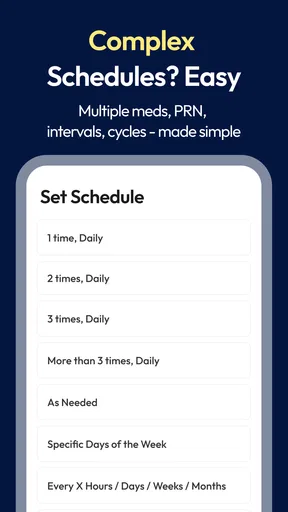
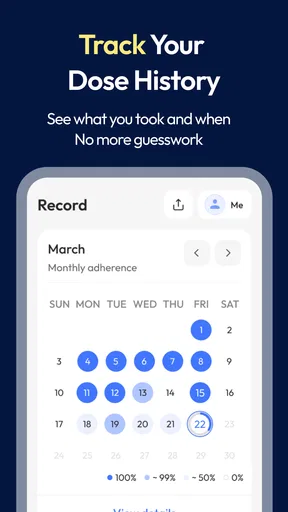
The Pill Reminder & Health Tracker app offers a comprehensive suite of features including medication reminders, health habit tracking, and detailed progress reports. Users can set up personalized schedules for their medications, receive notifications, and track their adherence over time. Additionally, it provides options to monitor health metrics and lifestyle habits, ensuring a holistic approach to health management.
Is the Pill Reminder & Health Tracker app user-friendly for all age groups?
Yes, the app is designed with an intuitive interface that caters to users of all age groups. It offers customizable settings and straightforward navigation to ensure ease of use. Features like large icons, clear instructions, and voice notifications are particularly beneficial for older users who may not be as tech-savvy.
Can I sync the app with other health devices or apps?
The Pill Reminder & Health Tracker app supports integration with various health devices and apps. This allows users to sync data from fitness trackers, smartwatches, and other health apps, providing a centralized platform for monitoring health metrics. This feature helps users maintain an accurate and up-to-date health profile.
Is my personal health data secure on the Pill Reminder & Health Tracker app?
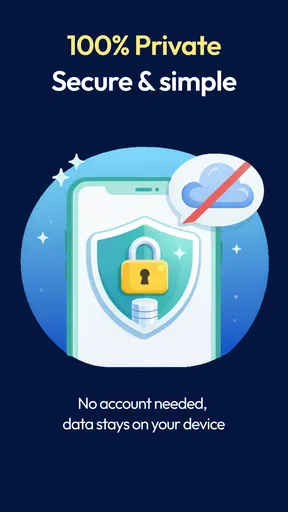
The app prioritizes user privacy and data security. It employs advanced encryption methods to protect personal data and adheres to strict privacy guidelines. Users can also set up additional security measures such as PIN codes or biometric authentication to ensure that their health information remains confidential and secure.
Does the app support multiple languages and regional settings?
Yes, the Pill Reminder & Health Tracker app supports multiple languages and regional settings, making it accessible to a global audience. Users can choose their preferred language and adjust settings to match their local time zones and measurement units. This flexibility ensures a personalized and culturally relevant user experience.


